Part 3 · CogniVault Architecture: Why We Keep Ollama Out of Docker

All abbreviations are fully explained in the appendix at the bottom of the page.
The golden rule of modern software deployment is containerization. Put everything in Docker to isolate the dependencies, and it will run the exact same way on every machine.
When initially designing CogniVault, the impulse was to put the FastAPI server, the PostgreSQL database, and the Ollama LLM engine all inside a single, secure Docker network.
But we didn’t. We left Ollama running natively on the host machine. Let’s break down why.
The GPU Passthrough Problem
Think of your GPU like the kitchen in a restaurant. The chefs (your AI models) need to be in the kitchen — standing at the stove, hands on the equipment. Now imagine telling the chefs they must cook from a sealed meeting room down the hall, passing instructions through a serving hatch. Technically food might still come out. It will not come out fast.
That sealed room is a container. Large Language Models like Gemma 4 need direct, unhindered access to your hardware’s GPU (like Apple Silicon’s Unified Memory or a dedicated Nvidia card) to generate text fast enough for a real-time chat interface. And the picture varies by platform:
- On macOS, Docker runs containers inside a lightweight virtual machine — and there is currently no GPU (Metal) passthrough at all. An Ollama container on a Mac runs CPU-only. For a chat app, that’s disqualifying on its own.
- On Linux, Nvidia GPU passthrough exists and works, but it requires extra toolkit configuration that breaks the “it just works” philosophy of local development.
Running Ollama natively sidesteps the whole category of problems.
The Bridge Solution
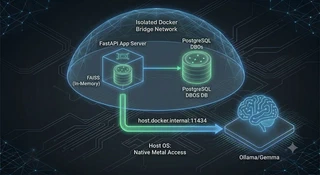
CogniVault uses a split deployment model, separating the application logic from the heavy AI processing.
- The Secure Rooms (Docker): PostgreSQL — which holds the DBOS workflow ledger from Part 2 — lives in a Docker Bridge Network (a private virtual network). Isolated, clean, reproducible.
- The Main Building (Native Host): Ollama runs directly on your Mac, Windows, or Linux host OS, giving it direct metal access to your GPU.
CogniVault actually ships two run modes, and it’s worth being precise about them:
- The default (
scripts/start.sh): only PostgreSQL runs in Docker. The FastAPI backend runs natively too (python -m backend.main), right next to Ollama. Simplest possible loop for local development. - The fully containerized mode (
docker-compose.yaml): the FastAPI app joins Postgres inside the compose network. In this mode the app container reaches the native Ollama engine through a special Docker routing address:host.docker.internal:11434.
Either way, the rule stays the same: the model never goes in the box.
What about the Vector Database?
You might notice FAISS isn’t a container here. Unlike massive SQL databases, FAISS is extremely lightweight. In CogniVault, FAISS runs directly inside the FastAPI Python process’s memory and saves its data to a local folder. It doesn’t need its own container.
By keeping the heavy LLM lifting on the metal and the bookkeeping in containers, we get the balance that notoriously trips up local AI development: zero dependency conflicts combined with maximum AI performance.
See It In Action
That wraps up the CogniVault architecture series! If you want to run this 100% local, privacy-first Study Companion on your own hardware:
- Grab the code: CogniVault on GitHub
- Watch the walkthrough: Full Demo on YouTube
Appendix: Abbreviations in this post
| Abbreviation | Full form | Meaning |
|---|---|---|
| GPU | Graphics Processing Unit | The hardware that makes local model inference fast; containers struggle to reach it |
| LLM | Large Language Model | A neural network trained on huge amounts of text that can read and generate language |
| AI | Artificial Intelligence | Software performing tasks that normally need human intelligence |
| API | Application Programming Interface | The set of URLs the frontend calls to talk to the backend |
| HTTP | HyperText Transfer Protocol | The protocol browsers and APIs use to exchange requests and responses |
| OS | Operating System | macOS, Windows, or Linux — where Ollama runs natively |
| DBOS | Database-Oriented Operating System | The durable-workflow library whose ledger lives in the Postgres container (see Part 2) |
| SQL | Structured Query Language | The language of relational databases like PostgreSQL |
| FAISS | Facebook AI Similarity Search | The in-process vector index — deliberately not a separate container |
| VM | Virtual Machine | The hidden layer Docker uses on macOS — and the reason Mac containers can’t reach the GPU |
